MyMule
A modern eMule client for your server or NAS. One small program for the eD2K and Kad networks, managed from your browser, your phone or the terminal.
Why MyMule
One file, nothing else
A single program with no dependencies: no separate daemon, web server, Python or Node to set up. For Windows, Linux, macOS, FreeBSD, ARM boards and NAS devices, in about 15 MB of RAM.
A real eMule client
eD2K and Kad, credits, AICH, source exchange, obfuscation and HighID: it talks to eMule and aMule as one of them.
Made to run unattended
It runs as a service, resumes after a stop or a reboot, checks everything other peers send, and has secure defaults.
Everything from the browser
A built-in web interface that works on phones and installs as an app, plus a command line for the terminal.
What it does
Downloads and sharing on eD2K and Kad
- Searches on the connected server or on every known server at once, and on Kad.
- Kad, the network without servers: searches and sources there too, your shared files published, and a full Kad node for others.
- MD4 verification of every 9.28 MB part, and AICH: only the damaged 180 KB blocks of a corrupt part are downloaded again. Peers that keep sending bad data are dropped.
- Sharing and uploads with a queue and slots taken in turns; upload and download speed limits. A speed schedule gives other limits at some hours.
- eMule's credit system, with secure identification: whoever uploads to you moves up in your queue, and the eMule and aMule users you upload to do the same for you.
- Protocol obfuscation for connections to users and servers, which hides eMule traffic from internet providers that slow it down.
- Resume after a stop, a crash or a reboot.
- HighID support, with the ports opened on the router by itself (UPnP or NAT-PMP), server callbacks and Kad buddies to reach firewalled peers.
- Source exchange and UDP queue reasks with other eMule and aMule clients.
- IP filter: eMule's ipfilter.dat, or a list downloaded every week.
- Compressed transfers with eMule and aMule clients.
- Everything other peers and nodes send is checked and bounded.
A web interface for any device
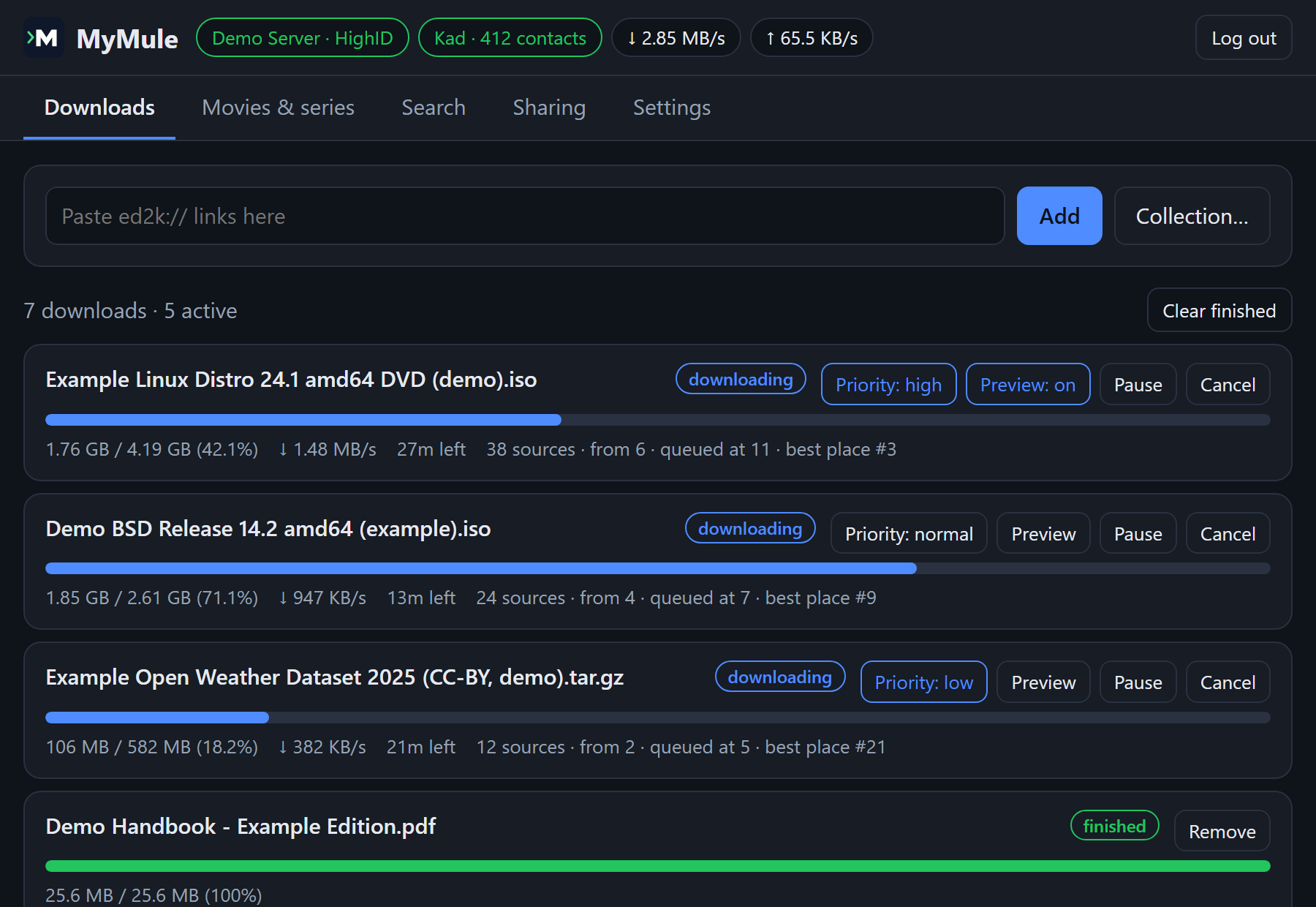
- Downloads, searches, sharing, servers and every setting, from any browser, phone included. It installs as an app on a phone or computer.
Your library, organized
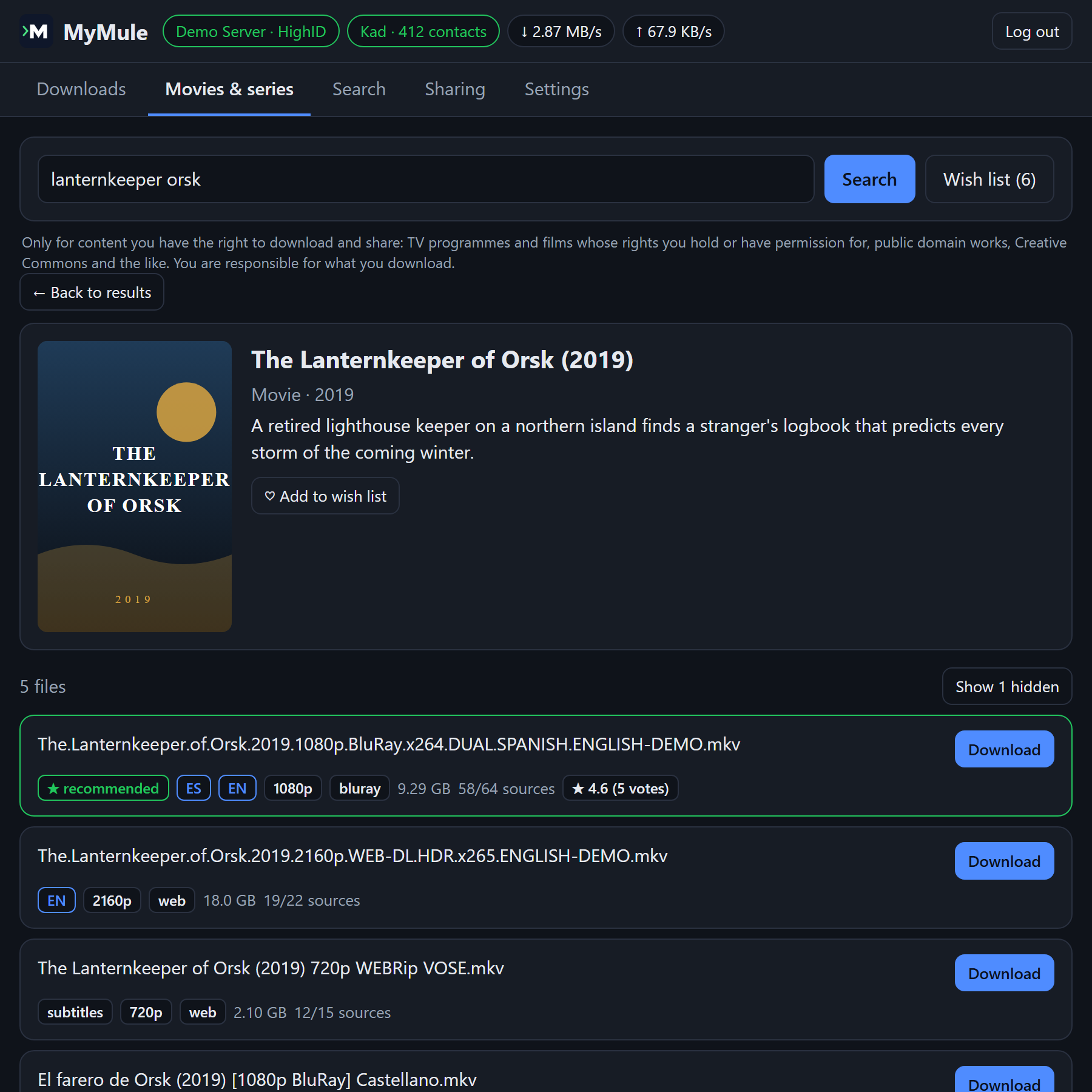
- Look a movie or series up by its title and get its files scored by language and quality; finished files are renamed into your movie and series folders, ready for Plex, Jellyfin or Kodi.
- Wish list: MyMule searches by itself for the movies and episodes you want, from the day they come out at home or air, and downloads them when a good file shows up. Or follow a whole series: every episode, aired or still to come.
- Ratings and comments that eMule users leave on files, so fakes stand out; the wish list never takes them.
- Download priorities, first and last parts first to watch a video sooner, eMule collections, and categories that send finished downloads to their own folders.
Always in view
- Statistics with speed and traffic charts, and
mymule doctor, which finds what keeps MyMule from working well and says how to fix it. - Notifications (ntfy, Telegram, Discord or any webhook), and Jellyfin, Emby or Plex told to scan their libraries when files arrive.
Only use MyMule for content you are allowed to download and share. See the terms of use.
Install
Docker
Any system with Docker, including NAS devices and Raspberry Pi (amd64, arm64 and armv7). In an empty folder:
docker run -d --name mymule --restart unless-stopped -e PUID=1000 -e PGID=1000 -v ./config:/config -v ./downloads:/downloads -p 4662:4662/tcp -p 4672:4672/udp -p 127.0.0.1:4711:4711/tcp ghcr.io/i234dev/mymule:latestThen open http://localhost:4711 and log in with the api_key from config/mymule.conf. Prefer Compose? Use the ready-made docker-compose.yml and run docker compose up -d. More in the Docker guide.
macOS and Linux
With Homebrew:
brew install i234dev/tap/mymuleSettings and downloads are kept in ~/MyMule. Update with brew upgrade mymule.
Windows
With Scoop:
scoop bucket add mymule https://github.com/i234dev/scoop-bucket
scoop install mymule
Settings and downloads are kept in %USERPROFILE%\scoop\persist\mymule. Update with scoop update mymule.
Download
Windows, Linux, macOS and FreeBSD, for Intel/AMD and ARM: get the archive for your system from Releases and unpack it anywhere. MyMule is portable: its settings and downloads live next to the program. On Windows, unpack the zip and double-click mymule.exe: the web interface opens in your browser.
Quick start
Without Docker, turn the web interface on in mymule.conf (created next to the program on the first run) and start MyMule:
web_ui = truemymule start # start the engine in the backgroundThen open http://127.0.0.1:4711 and log in with the api_key from mymule.conf.
Every release comes with a SHA256SUMS file and a signed build provenance attestation. The documentation has a guide for each part: installing, the web interface, movies and series, the command line, configuration and security, the *arr apps and the API.
Works with
Radarr, Sonarr and friends
A Torznab indexer and a qBittorrent-compatible download client, so eD2K becomes one more source for Radarr, Sonarr, Lidarr, Readarr and Prowlarr.
Plex, Jellyfin and Emby
Asked to scan their libraries when new files arrive, so they show up right away.
HTTP API
A small JSON API for scripts: PHP, Python, shell, cron jobs and home automation.
For the terminal
A background daemon with short commands, and mymule top, a live full-screen view where you can also search and manage downloads.
mymule status                # server, speed and progress of every download
mymule search -links ubuntu  # search; -links prints ed2k:// links
mymule add "ed2k://|file|...|/"
mymule top                   # live view (q to quit)
mymule doctor                # what keeps MyMule from working well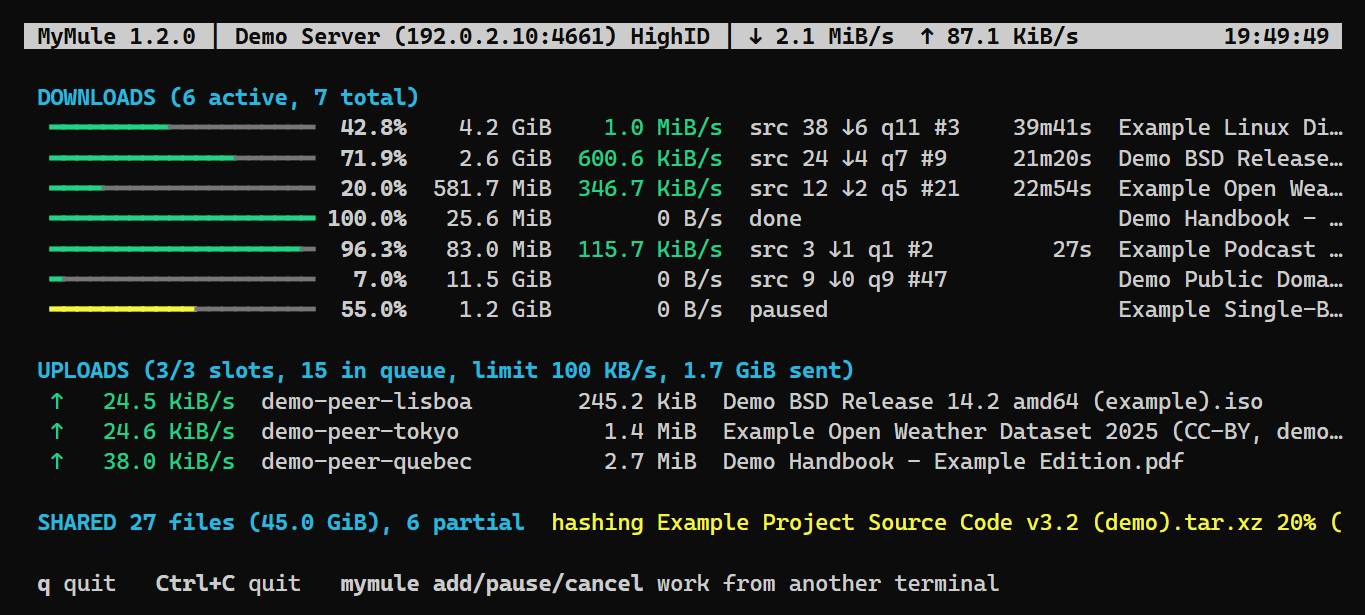
mymule top, the live view in the terminal, with demo data.Questions
Does it work with eMule and aMule users?
Yes. MyMule joins the same eD2K servers and the same Kad network, so you download from and share with everyone using eMule, aMule and other compatible clients.
What is HighID, and do I need it?
With HighID other users can connect to you directly, so you get many more sources and faster downloads. MyMule opens port 4662 (TCP) and 4672 (UDP) on your router by itself with UPnP or NAT-PMP, if the router allows it; otherwise forward them by hand to the computer running MyMule. Without HighID MyMule still works, with LowID and fewer sources.
Is it safe to run?
Everything that other users, servers and Kad nodes send is checked and limited, and a bad packet ends that connection, not the program. The web interface and the API only answer on your own computer unless you change it, and always need a key. Never forward port 4711 in your router. Keep in mind that eD2K is a public network: others see your IP address and the files you share.
Is it legal?
MyMule is a client for an open file-sharing protocol, as a web browser is for the web. What you download and share is up to you: only use it for content you are allowed to share, such as free software, public domain works or your own files. Please read the terms of use.
Why MyMule and not aMule?
MyMule started as a personal project, before I knew aMule was being revived. Today there are great options: aMule is the mature, long-standing client, actively developed again, with more of eMule's classic features; with aMuTorrent you also get a modern web interface and Sonarr/Radarr support. MyMule is a smaller, independent client written from scratch: it may suit you if you want a single program with nothing else to set up and connect, a media library that finds movies and series by title and renames them for you, and a small footprint. If you need a feature MyMule doesn't have, aMule is a great choice. Both share the same network, so either way you help keep it alive.
What does it not do yet?
Some of eMule's extras, such as friends and chat, are not implemented. Ideas and bug reports are welcome on GitHub.
Is it free?
Yes: it is free software under the GNU GPL v3, with no ads and no account to create. Its source code is on GitHub.
Only use MyMule for content you are allowed to download and share. eD2K is a public network: other users see your IP address and the files you share. Please read the terms of use and disclaimer before using it.